
Keeping track of truck inspections is now easier than ever in Datatruck. With the Inspection List, you can access all inspection records directly from a truck’s profile in Fleet Management.
How to View Inspections
Go to Fleet Management.
Open the truck’s profile you want to review.
Click on the Inspections tab.
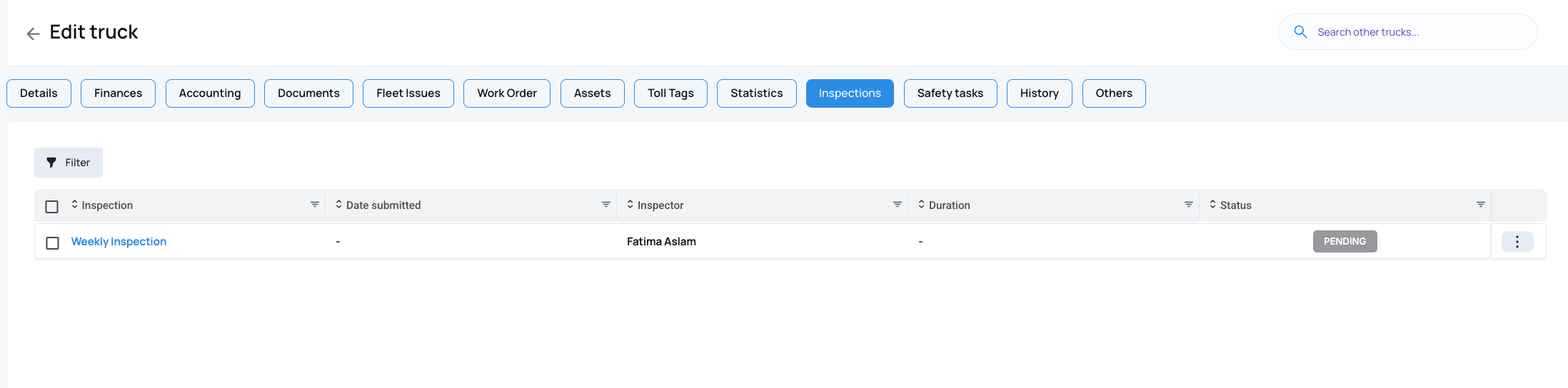
What You’ll See
In the Inspections tab, you’ll find a complete list of inspections created for that specific unit. For each inspection, you can view details such as:
Status: whether the inspection is completed or pending.
Name: the title of the inspection form.
Date: when the inspection was carried out.
Inspector: who performed the inspection.
Duration: how long it took to complete the form.
Why It’s Helpful
This feature gives you a clear history of every inspection performed on a truck. By keeping all inspection details organized in one place, you can:
Monitor the health and compliance of your fleet.
Track inspection performance over time.
Quickly reference past inspection records when needed.
With the Inspection List, managing and tracking inspections for your trucks has never been more straightforward.
We hope this article was helpful. However, if you have any further questions, please don't hesitate to reach out to our Live Support.
Comments
0 comments
Please sign in to leave a comment.