
Keeping telematics data up to date ensures accurate tracking, reporting, and integration with your systems. If your telematics information is not syncing automatically, you can manually update it by following these steps.
Steps to Sync or Update Telematics
Step 1: Navigate to Telematics Settings
Go to Settings in the left-side menu.
Select Integrations.
Click on Telematics.
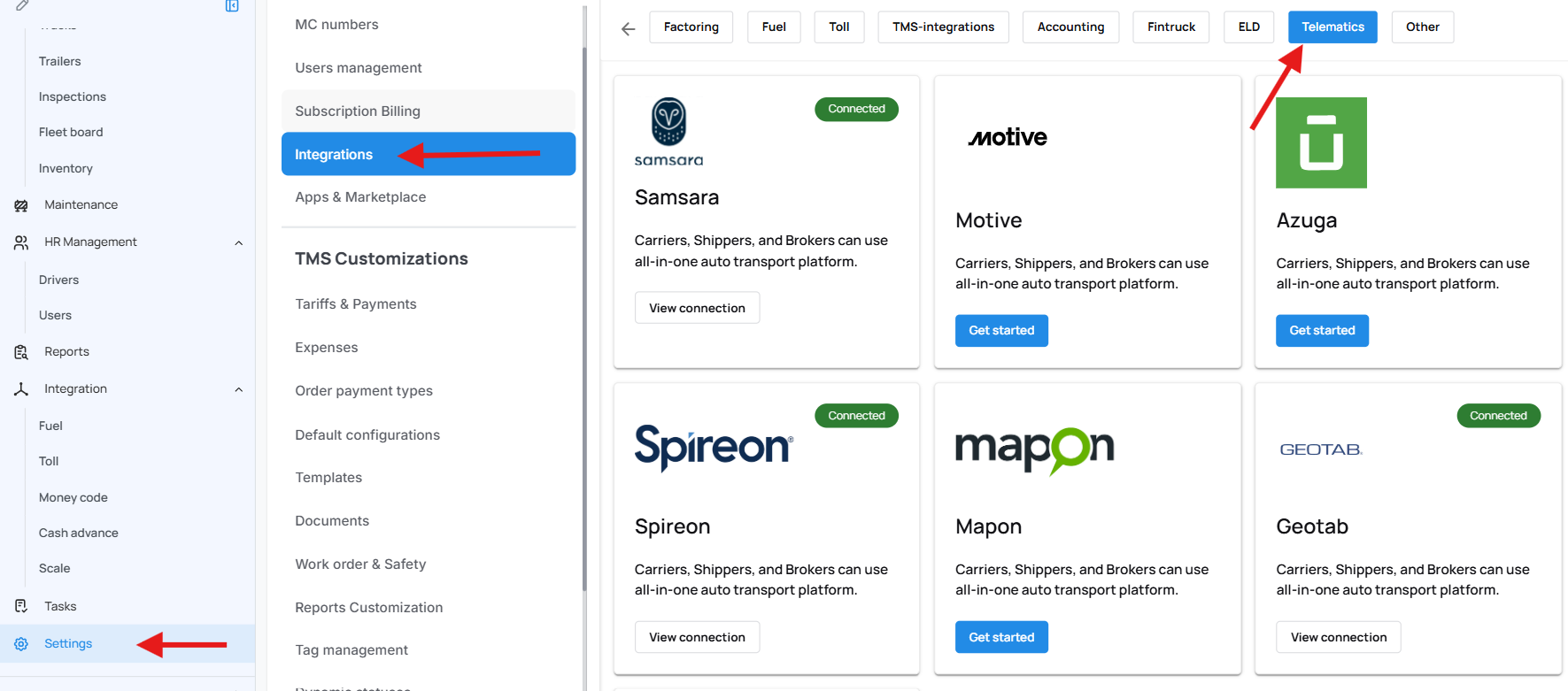
Step 2: Access Your Provider Connection
Locate your telematics provider in the list.
Click View Connection under the provider’s name.

Step 3: Sync the Data
Click the green Sync button to update the telematics information.
The system will retrieve the latest data from your telematics provider.
When to Use Manual Sync
Manual syncing is recommended when:
Telematics data is not updating automatically
Recent vehicle activity is missing
You want to ensure all connected vehicles reflect the latest telematics information
We hope this article was helpful. However, if you have any further questions, please don't hesitate to reach out to our Live Support.
Comments
0 comments
Please sign in to leave a comment.