
Step 1: Get Your FTP Credentials from TCS
To begin, contact your TCS representative and request your FTP login credentials.
These typically include:
- Username
- Password
Email Template:
To: [insert your fuel provider's email]
Subject: Request for FTP Integration Access
Body: Good afternoon,
We are setting up a new TMS system, Datatruck. Please provide the FTP credentials to enable integration.
Our MC number is [insert MC number here].
Please let us know if any additional information is required.
[Your Company Name]
[Your Contact Information]
Step 2: Submit the Completed Form to TCS
You’ll receive a form from TCS, fill in the required details exactly as shown below and submit it.
Service Provider: DataTruck
Primary Contact: Mamur Kodirov
Phone: +1 708 887 2386
Email: Info@datatruck.io
Street Address: 4113 Esters Rd Suite 617
City: Irving
State/Province: Texas
Zip/Postal Code: 75038
Once completed, send the form back to your TCS representative for verification and processing.
After reviewing your submission, TCS will share your FTP credentials
Step 3: Set Up the Integration in Datatruck
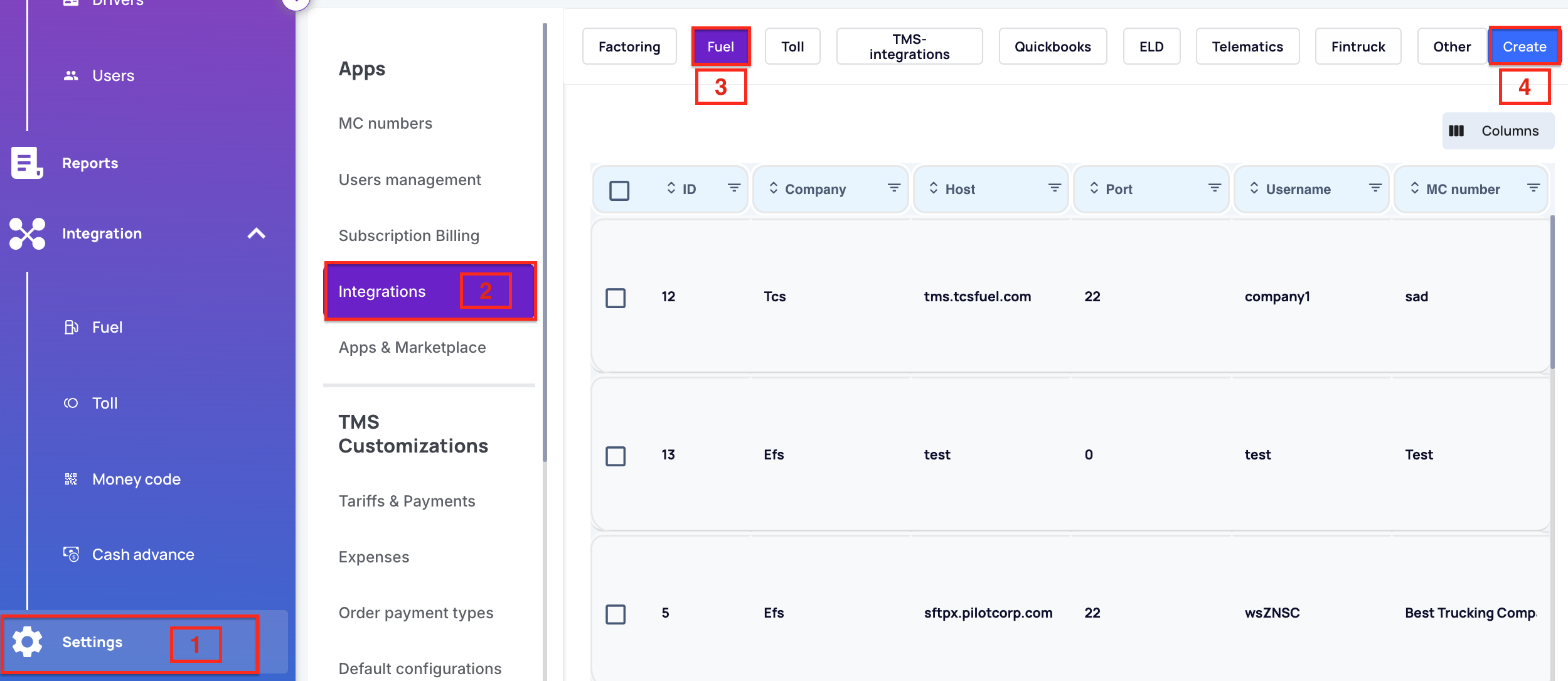
- Log in to your Datatruck account through the web https://app.datatruck.io
- Go to Settings.
- Click on the Integrations tab.
- Go to the Fuel section.
- Click Create.
Step 4: Enter the Required Details
- Fill in all relevant fields using the FTP credentials you received from TCS. These details allow Datatruck to connect and sync with your TCS account.
-
From the Company dropdown menu, please choose TCS.
-
Please checkmark Active and click Save.
By successfully completing these steps, your transactions will sync seamlessly!
We hope this article was helpful. However, if you have any further questions, please don't hesitate to reach out to our Live Support.
Comments
0 comments
Please sign in to leave a comment.