
New Features:
1. Dispatch Board 2.0
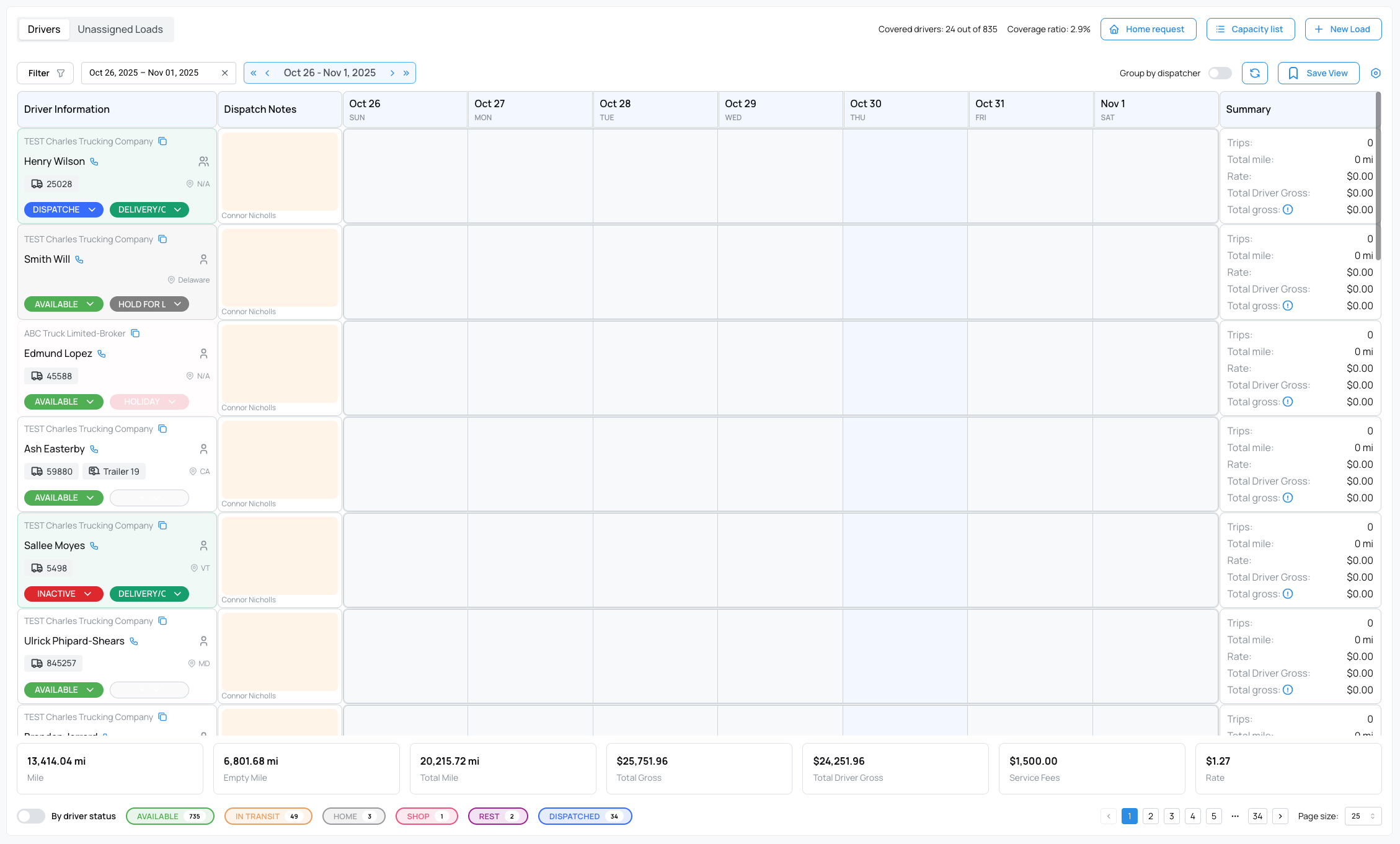
We’re excited to introduce Dispatch Board 2.0, a completely redesigned and refactored dispatching experience built for speed, scalability, and usability.
This new version delivers a smoother workflow, modern interface, and improved performance for fleets of all sizes, especially those managing large driver and trip volumes.
What’s New
Redesigned Interface: A modern design with improved visibility and intuitive navigation.
Performance Upgrades: Faster load times and improved stability for fleets with 1,000+ drivers or high trip volumes.
Real-Time Data: Enhanced synchronization ensures driver statuses, documents, and metrics update live with minimal delay.
Summary Metrics: Quickly view total miles, gross, driver gross, service fees, and rates right from the board.
Driver Insights: See driver availability, trip details, ELD data, VIN, live location, ETA, and delivery status, all in one view.
Filters & Saved Views: Filter by date, driver, truck, or view type, and save your configurations for quick access.
Coverage Indicator: Instantly see the number and percentage of drivers currently covered.
Daily Notes & Quick Actions: Add trip notes, alerts, and perform actions like “Home Request,” “Shop,” or “Rest” directly from the board.
2. Add "Amount Due" to All Invoice Types
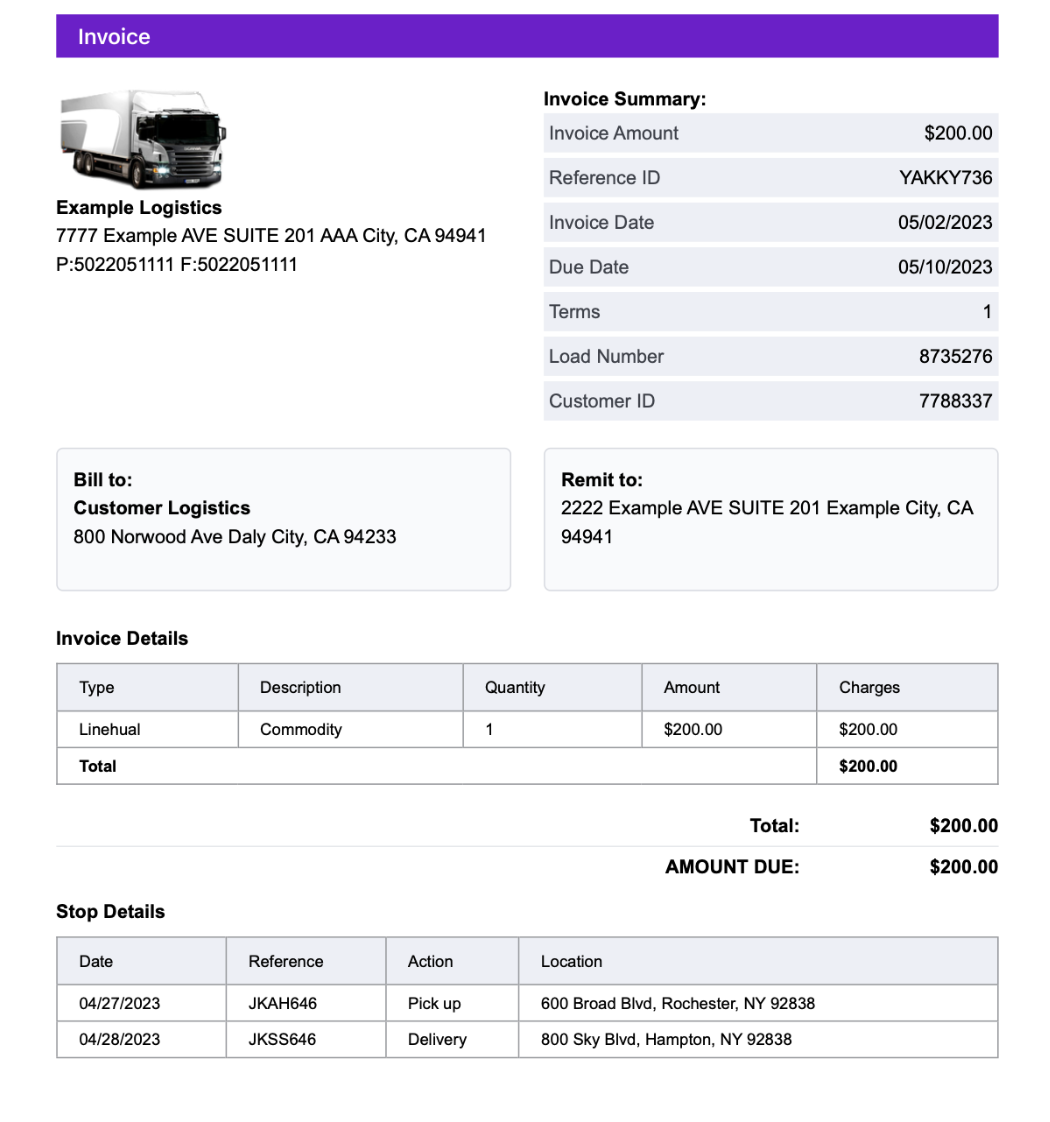
We’ve introduced a new “Amount Due” field across all invoice types to provide clearer visibility into outstanding balances.
The Amount Due value now appears directly on every invoice, ensuring customers and accounting teams can easily identify any remaining payment balance.
This feature enhances financial transparency and simplifies payment tracking across different billing scenarios.
With this update, you can quickly confirm what’s been paid, what’s pending, and maintain a more accurate record of your receivables, all in one view.
3.BOL Checkbox Added to Customer Profile
A new Bill of Lading (BOL) checkbox has been introduced to the customer profile settings.
This checkbox allows you to specify whether a BOL is required for a particular customer.
By default, the BOL checkbox is unchecked, giving you the flexibility to enable it only when necessary.
This feature helps streamline document handling by tailoring BOL requirements to each customer’s preferences, reducing unnecessary paperwork and improving operational efficiency.
4. Add Trips Within Dispatcher Settlement
You can now add trips directly inside the dispatcher settlement interface. This update allows for smoother workflow and better oversight of trips associated with settlements.
5: Integrate HOS & Trailer Information from Motive
We’ve expanded the Motive integration to now include Hours of Service (HOS) and Trailer data, similar to the existing functionality with Samsara.
This update allows dispatchers and fleet managers to view HOS records and trailer information directly within the platform.
6. Move PrePass Integration to RestAPI from SFTP
The PrePass integration has been upgraded from SFTP to REST API.
This change modernizes the data connection, improving speed, reliability, and security.
Users can expect faster updates and a more seamless experience when accessing Prepass data.
7. Outlook and Gmail Integration
We’ve added Outlook and Gmail integration for all invoice, salary, and bill settlements.
With this update, all automated emails are now sent directly from your own domain, ensuring more professional communication and improved email deliverability.
This enhancement streamlines correspondence, reduces spam filtering, and helps maintain consistent branding across all outgoing messages.
8. Chase NACHA File Integration
We’ve introduced Chase NACHA file integration, allowing you to send payroll directly through your Chase bank account.
This enhancement streamlines the payment process by enabling secure, automated transfers without manual uploads. It saves time, reduces errors, and ensures faster, more reliable payroll processing.
9. Load Notes Report Added to Custom Reports
Generate customizable load notes reports quickly and accurately.
Users can now create a Load Notes Report from the Custom Report section, selecting specific fields to include. The report is delivered as an Excel file via email, containing only the chosen columns with correct data.
A success message confirms when the email is sent.
Proper error messages are displayed if any issues occur.
This makes sharing and reviewing load notes easier, faster, and more reliable.
10. Editable “Show Address Info” Field in Driver Settlement PDF Type 6 (Enhancement)
The “Show Address Info” field in Driver Settlement PDF Type 6 is now editable and fully functional. Users can choose whether to display address details on the PDF, providing greater flexibility to customize statements according to their business needs. This enhancement ensures that driver settlements are clearer, more accurate, and aligned with your reporting preferences.
11. Bill Batch PDF Now Supports Grouping by Truck (Enhancement)
Truck-related expenses are now grouped for clearer vendor statements.
The Bill Batch PDF has been enhanced to group all expenses by truck, making it easier to review and reconcile costs on vendor statements.
This improvement simplifies tracking, reduces confusion, and provides a more organized view of truck-specific expenses.
12. Adding Accessorials to Driver Trips
Easily include additional pay items in trip earnings.
Datatruck now allows you to add any accessorial or extra pay item, such as layovers, detention, bonuses, or other custom charges, directly to a driver’s trip.
Adding a trip charge ensures accurate compensation and keeps all earnings tied to the specific load for clear reporting and payroll consistency.
13. Temperature Information Display in the Driver Mobile App
Drivers can now view temperature requirements directly in the DT Drivers App.
This feature gives drivers instant access to temperature details for temperature-sensitive loads, helping ensure compliance and prevent costly issues such as:
Load rejection
Claims or penalties
Customer dissatisfaction
Having temperature info displayed in-app allows drivers to verify requirements at a glance, reducing mistakes and improving delivery reliability.
14. How To Display Both Pick-Up & Delivery Time On Statements
Improve visibility with complete PU/DEL time details on statements.
You can now show both Pick-Up (PU) and Delivery (DEL) dates and times on your statements, giving you full visibility for every load across your documents.
This customization is available on:
Driver Statements
Dispatcher Statements
Bill Statements
15. Approval” Feature for Cash Advance Transactions (Web)
Introducing approval workflow for cash advance transactions.
A new Approval Status column has been added to the transactions table, with the following possible values:
Pending
Approved
Rejected
Default statuses:
Transactions from integrations → Approved
Manually added transactions (web) → Approved
Mobile cash advance requests → Pending
Actions for Pending Transactions:
A new action menu now appears for transactions with a Pending status, offering:
Approve (opens a modal with a “Billable” checkbox)
Reject
These actions are visible only for transactions requiring approval.
16. Mudflup Fuel Integration
Datatruck now supports direct integration with Mudflup, allowing your fuel purchase data to flow into the platform automatically. This eliminates manual uploads, reduces errors, and ensures all fuel expenses stay synced with your fleet records.
17. CatScale Fuel Integration
Automatically sync CatScale fuel-related data directly into Datatruck.
Datatruck now supports integration with CatScale, allowing weight-related and fuel-associated data to be imported seamlessly into your account. This helps ensure accuracy across reporting, compliance, and trip management, without manual entry.
18. ZigZag ELD Integration
Connect your ZigZag ELD data directly to Datatruck for seamless fleet visibility.
Datatruck now supports integration with ZigZag ELD, enabling automatic syncing of driver logs and key telematics data into the platform. This eliminates manual data handling and ensures your compliance and fleet records stay accurate and up to date.
19. Vitality ELD Integration
Seamlessly sync Vitality ELD data into Datatruck for improved compliance and fleet visibility.
Datatruck now integrates with Vitality ELD, allowing driver logs and key telematics data to flow automatically into the platform. This helps streamline compliance, reduce manual work, and keep all fleet activity accurately recorded.
20. Lucid ELD Integration
Automatically sync Lucid ELD data with Datatruck for better compliance and operational visibility.
Datatruck now supports integration with Lucid ELD, allowing driver log and vehicle activity data to be imported directly into your account. This eliminates manual updates, reduces errors, and keeps your compliance records consistently accurate.
AI Updater New Release Updates 10/15/2025
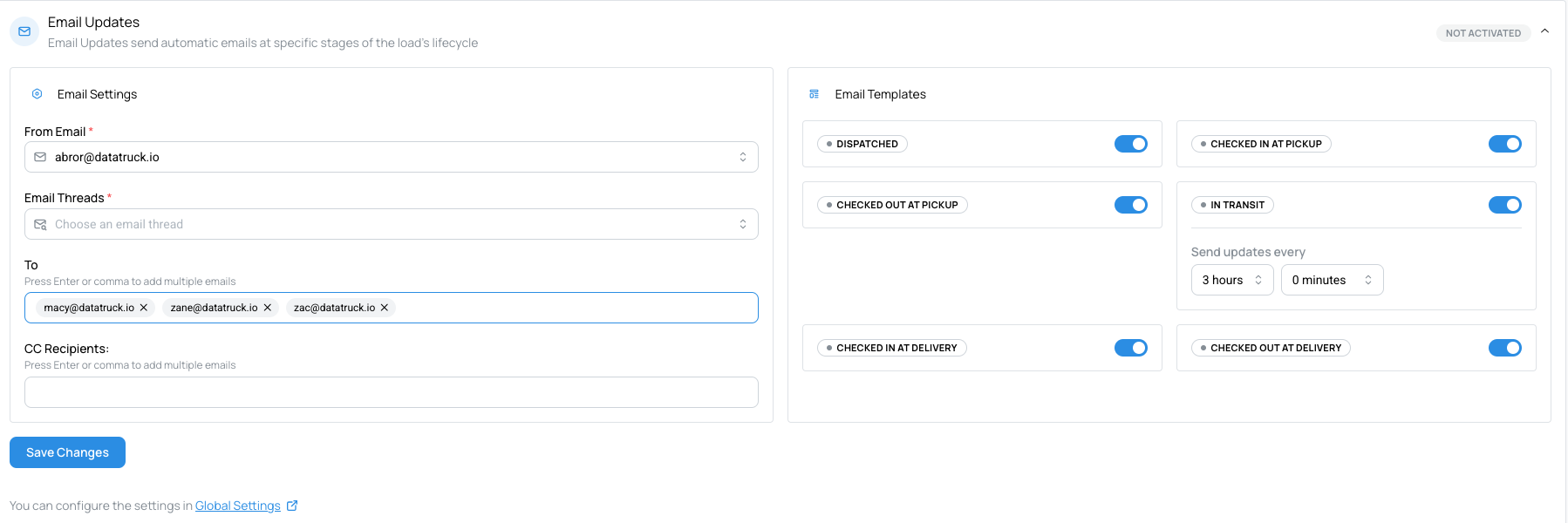
1. New Feature: Support for Multiple Recipients in AI Updater
We’ve enhanced the AI Updater to make communication easier and more efficient!
You can now add multiple recipient email addresses in the “To” field within the AI Updater settings.
Before: Only one recipient could be added per email configuration.
Now: Multiple recipients can be added, allowing broader communication and smoother collaboration among stakeholders.
This update increases flexibility and ensures that all relevant team members receive automated updates at the same time
2. New Feature: Live Updates in AI Dispatcher
We’re excited to introduce Live Updates in AI Dispatcher, designed to keep your load searches continuously up to date in real time.
Live Refresh: When the Live Updates button is enabled, AI Dispatcher automatically refreshes load data every 30 seconds from connected load boards.
One-Click Activation: Simply turn the feature on once — it will continue running seamlessly in the background.
Smarter Visibility: Dispatchers always see the most current loads without needing to manually refresh.
This new feature enables faster decision-making, prevents missed opportunities, and provides a smooth, real-time experience when managing loads across multiple load boards.
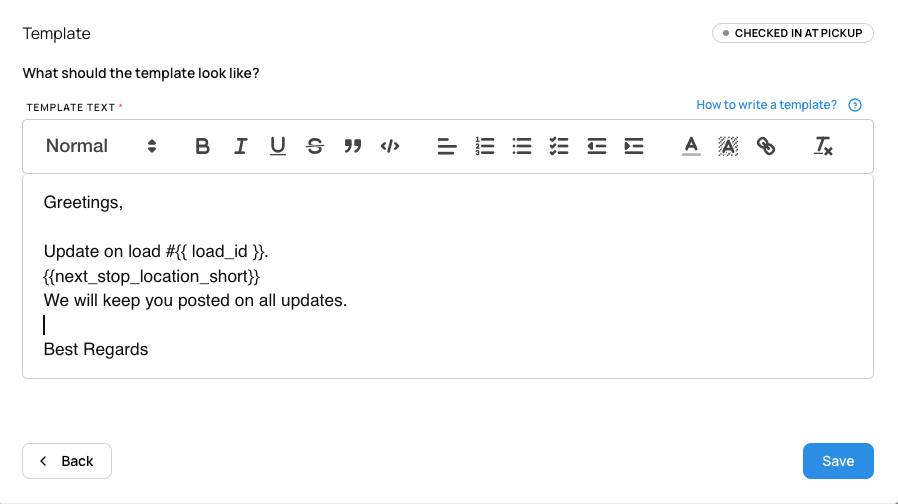
3. Improvement: New {{ next_stop_location_short }} Placeholder in AI Updater
We’ve added a new placeholder to AI Updater email templates to provide more concise location details.
New Placeholder:
{{ next_stop_location_short }}
This placeholder includes only the city, state, and ZIP code, excluding the street address.
This enhancement offers a cleaner and more focused way to reference next-stop locations in automated emails, making your communications more compact, clear, and professional.
4. Improvement: Localized Timezones for Check-In and Check-Out
The AI Updater now displays check-in and check-out times based on each stop’s local timezone, rather than the delivery location’s timezone.
Before: All timestamps were shown according to the delivery location’s timezone, which could cause confusion for multi-stop or cross-timezone trips.
Now: Timezones automatically adjust to the truck’s current stop location, ensuring accurate and context-aware time tracking.
This improvement brings greater clarity and precision to load activity timelines, especially helpful for carriers operating across multiple time zones.
5. Feature: Spot Rate (UI)
See market rate insights right where you work.
Before:
Rate checks required switching between tools or relying on rough estimates.
Now:
Inline spot rate visuals appear directly in your workflow, helping you quickly gauge pricing, compare against current offers, and make more confident decisions.
This reduces guesswork and speeds up negotiations.
6. Integration: Truckstop Loadboard
Work with Truckstop loads without leaving your workflow.
Before:
You had to switch between separate systems to search, review, and act on Truckstop loads.
Now:
Truckstop is integrated directly into your loadboard with consistent filters, sorting, and actions.
This eliminates context switching and creates a smoother end-to-end workflow.
7. Integration: UberFreight Loadboard
Access UberFreight loads in a unified view.
Before:
Reviewing UberFreight opportunities required separate navigation and offered inconsistent layouts.
Now:
UberFreight loads appear alongside your existing load sources, using the same familiar search, filters, and layout.
This provides a unified, consistent experience across providers.
8. Feature: Zone and State-Based Search
Find loads faster by searching entire regions, not just cities.
Before:
Search was limited to specific cities, requiring multiple queries to cover larger areas.
Now:
You can search by whole states and predefined regions, making it easier to discover loads across broader markets.
This speeds up workflows and improves coverage across target areas.
Comments
0 comments
Please sign in to leave a comment.