
Integrating E-Capital factoring with DataTruck allows you to streamline invoice submission and improve cash flow management. This guide explains how to obtain the required FTP credentials and complete the integration.
To connect your DataTruck account with E-Capital factoring, you will need FTP credentials provided by an E-Capital representative.
Email Template:
To: [insert your factoring company email]
Subject: Request for FTP Integration Access
Body:
Good afternoon,
We are setting up a new TMS system, Datatruck. Please provide the FTP credentials to enable integration, especially:
- Host
- Username
- Password
- Remit Notice
Our MC number is [insert MC number here].
Please let us know if any additional information is required.
[Your Company Name]
[Your Contact Information]
Set Up the Integration in Datatruck
Log in to your Datatruck account through the web https://app.datatruck.io
Go to Settings.
Click on the Integrations tab.
Go to the Factoring section.
Select Create to begin a new integration.
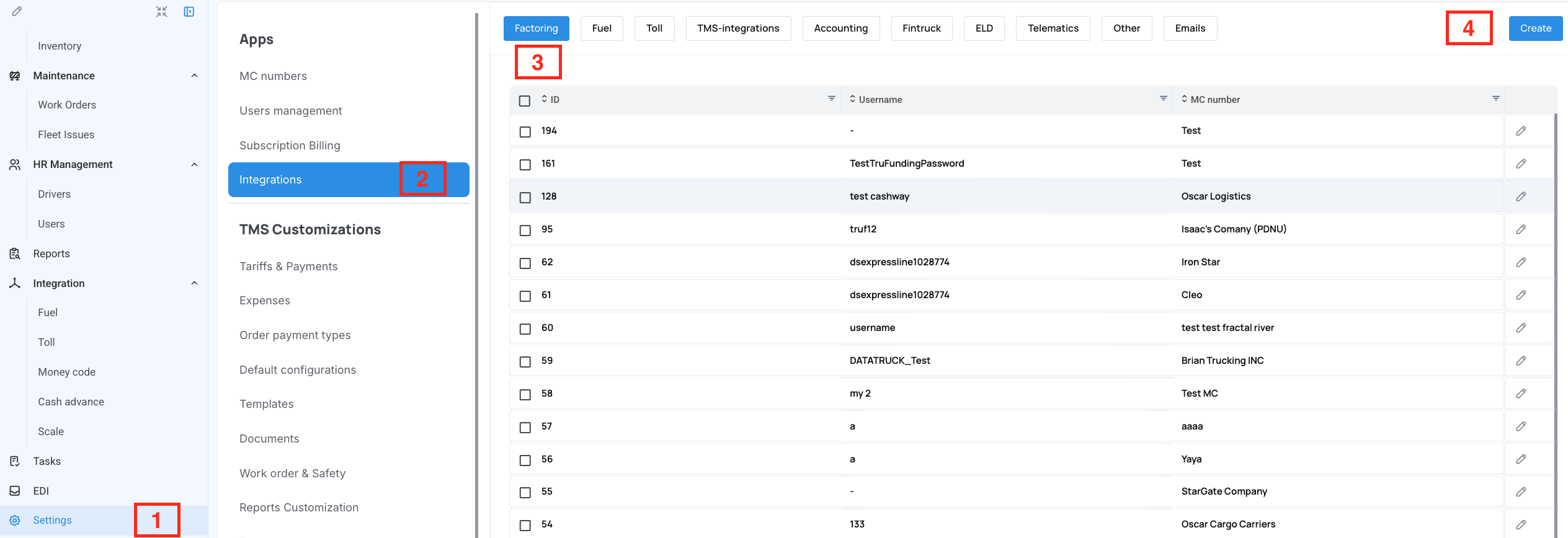
Enter the Required Details
Fill in all relevant fields using the FTP credentials you received from E-Capital. These details allow Datatruck to connect and sync with your factoring account.
Click to Save the integration.
We hope this article was helpful. However, if you have any further questions, please don't hesitate to reach out to our Live Support.
Comments
0 comments
Please sign in to leave a comment.